Entering A New Listing
Note: When you hit the Save button the information you entered will be
saved to the database. If you did not include a captured screen shot top
upload this will happen quite quickly. If you included an image to
upload this Save might take a minute of two as the file is first
uploaded to the web server. Please be patient.
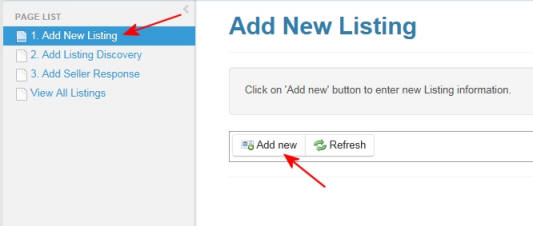
1. Start with clicking on the 'Add New Risting' and then the Add new
button to start entering a new Review.
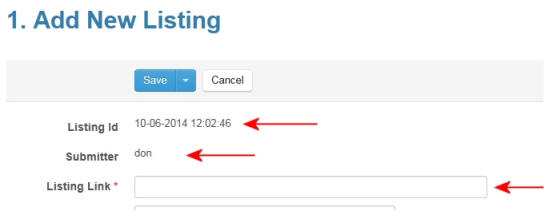
2. A unique 'Listing Id' is automatically generated and the Submitter
field is auto-populated with your log in name.
The first field you must enter is the listing Link. this is the web address of the listing you want to review.
Tip: 'copy and paste' the Listing Link from your browser to limit possible errors.
The first field you must enter is the listing Link. this is the web address of the listing you want to review.
Tip: 'copy and paste' the Listing Link from your browser to limit possible errors.
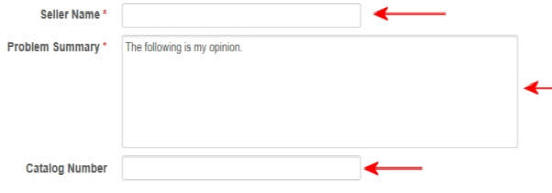
3. Enter the sellers name exactly as it
appears on the web site. This is a required field.
Enter your Review in the Problem Description. Please see Rules for the proper way to enter a review. This is a required field.
Enter catalog number of listing (if applicable).
Enter your Review in the Problem Description. Please see Rules for the proper way to enter a review. This is a required field.
Enter catalog number of listing (if applicable).
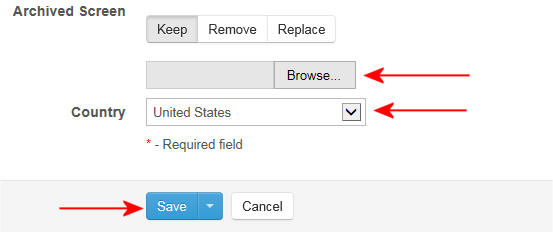
4. You can add a captured screen shot of the listing that has ben saved
on your PC by clicking on the Browse button. The file will be uploaded
when you click on the Save button.
Please select the country from the drop down list. If it is a non-country specific collection or lot please select 'Worldwide'.
Please select the country from the drop down list. If it is a non-country specific collection or lot please select 'Worldwide'.